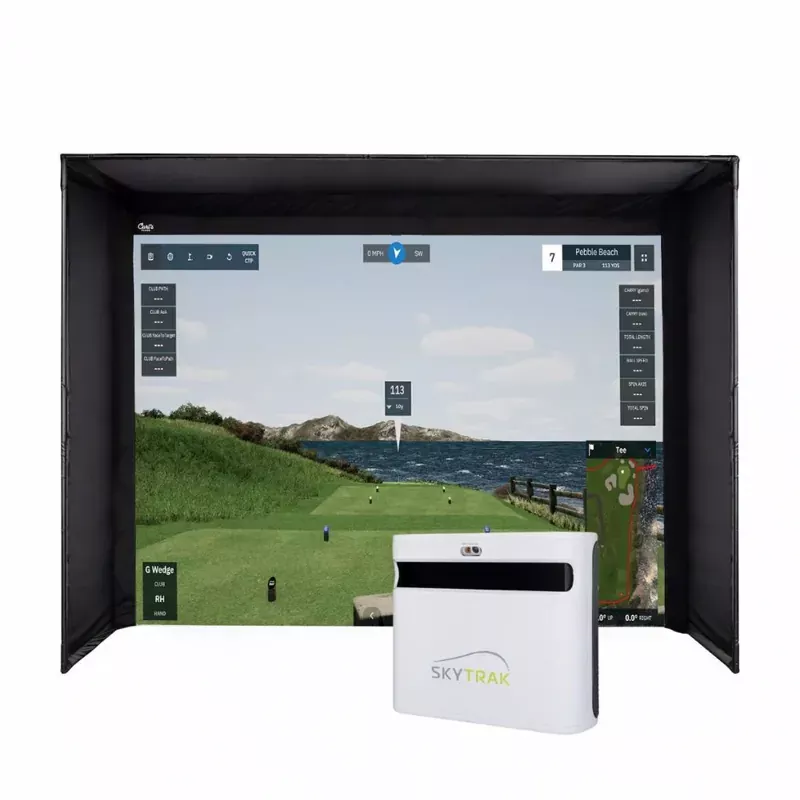
The Austad’s DIY Series Golf Simulator Package with the SkyTrak+ Launch Monitor is built for golfers who want a complete home simulator setup without going full custom. By pairing the>
Perfect for garages, basements or bonus rooms, the DIY Series makes it easier to practice, play and compete from home year-round. Whether you’re dialing in your distances, squeezing in a quick range session or playing a virtual round with friends, this package gives you the tools to work on your game without overcomplicating the setup.
What’s Included In This Package
The DIY Series Golf Simulator Package with Skytrak+delivers the perfect blend of affordability, performance and flexibility. Whether you’re looking to sharpen your game, play more often or create a fun space for family and friends, this package makes simulator ownership more accessible than ever.
Launch Monitor: Skytrak+Launch Monitor
Simulator Enclosure:Carl’s DIY Series Enclosure in choice of 2 sizes and 2 options for screen quality
Hitting Mat:High quality Hot Shot Hitting Mat in choice of 2 sizes
Projector:Choice of three high quality projectors
Optional Additions
Fairway Flooring: Completes the look and feel of your space with green turf covering the entire simulator
Technology Bundle: Simulator-optimized gaming computer with computer cart
Professional Installation:Leave the setup to the professionals and focus on enjoying your new simulator. Available within 100 miles of any Austad’s Golf Store
Space Requirements
For the SkyTrak+ Launch Monitor, the unit sits beside the golf ball instead of several feet behind it, making it a great option for tighter simulator spaces, garages and indoor setups where depth is limited. Most golfers will still want 8–10 feet from the ball to the screen for comfortable play and proper ball flight into the impact screen. The chart below reflects practical real-world dimensions for most golfers rather than absolute bare-minimum clearances.
Space Requirement
8′ x 10.5′ DIY Cage + SkyTrak+
9′ x 12′ DIY Cage + SkyTrak+
Minimum Room Width
10′
12′
Recommended Room Width
12′
14′
Minimum Room Depth
12′
12′
Recommended Room Depth
14-16′
14′-16′
Minimum Ceiling Height
9′
9’6″
Recommended Ceiling Height
10′
10’–11′
Quick Notes
8′ x 10.5′ DIY Cage
Best for tighter garages, basements or spare rooms where space is limited.
Great option for golfers who want a complete simulator experience without needing a large dedicated room.
SkyTrak+ sits beside the ball, so this setup does not require the extra rear clearance needed by radar-based launch monitors.
A smart fit for most golfers with a controlled indoor swing and enough ceiling height for their longest club.
Ideal for players looking for an affordable, space-friendly home golf simulator setup.
Recommended room size: 12′ W x 14’–16′ D x 10′ H
9′ x 12′ DIY Cage
Best for golfers who want a more comfortable and immersive simulator setup.
Extra width gives players more room to swing freely and confidently.
Larger screen presence creates a better visual experience for practice, simulator rounds and playing with friends.
The better long-term choice if your room allows for the extra space.
Recommended room size: 14′ W x 14’–16′ D x 10’–11′ H
Austad’s Sim Caddie Recommendation: If you’re choosing between the two, Austad’s Sim Caddie recommends going with the 9′ x 12′ DIY Cage + SkyTrak+ whenever your room allows. The SkyTrak+ already saves space by sitting beside the ball, so using that advantage with a larger enclosure gives you more swing confidence, better screen coverage and a more realistic simulator feel.
For tighter spaces, the 8′ x 10.5′ DIY Cage + SkyTrak+ is still a smart, budget-friendly option that keeps the setup simple while delivering the data and playability golfers want from a home simulator.
How to Measure Your Space for a Golf Simulator
Before selecting a simulator package, take a few quick measurements to ensure your room can comfortably accommodate both the enclosure and your golf swing.
1. Measure Your Ceiling Height
Measure from the floor to the lowest point of the ceiling.
We recommend 10′ ceilings or higher for the most comfortable experience.
Many golfers can swing with 9′ ceilings, but driver swings may feel restricted.
Watch for garage door openers, light fixtures, ceiling fans, ductwork, and beams.
2. Measure Your Room Width
Measure the usable width of the room from wall to wall.
Add extra clearance for a comfortable driver swing.
If both right- and left-handed golfers will use the simulator, additional width may be required.
We typically recommend 12’–14′ of room width for most setups.
3. Measure Your Room Depth
Measure from the wall where the screen will be installed to the back wall.
Remember to account for:
Distance from the screen to the hitting area
Space behind the golfer
Launch monitor placement (if applicable)
Most simulator setups require 16’–20′ of total room depth.
4. Check for Obstructions
Look for anything that could interfere with your swing or installation:
Garage door tracks
Support beams
Windows
Electrical panels
Shelving
Light fixtures
Ceiling-mounted storage
5. Consider Your Hitting Position
The golfer should be centered on the screen whenever possible.
Ensure there is enough room to swing all clubs comfortably, especially the driver.
If multiple golfers will use the simulator, make sure the hitting area accommodates both right- and left-handed players.
6. Take a Few Photos
Snap photos from each corner of the room.
Include any obstacles or unique features.
Photos help our Sim Caddies recommend the best enclosure, launch monitor, and projector for your space.
Austad’s Sim Caddie Tip
When in doubt, measure twice. A few extra inches can make a big difference in comfort and playability. If you’re unsure whether your space will work, send us your room dimensions and photos, and we’ll help you find the right simulator setup.
Launch Monitor Detail
Why Golfers Love the SkyTrak+
Accurate data, powerful simulator software, and dual-camera feedback—without the premium price tag.
It gives you serious data without the serious-room requirement. SkyTrak+ sits beside the golf ball instead of several feet behind it, making it a great fit for garages, basements and tighter indoor simulator spaces.
It tracks both ball and club data. With dual Doppler radar and an improved photometric camera system, SkyTrak+ measures key performance numbers like ball speed, launch angle, back spin, side spin, carry distance, club head speed, smash factor, club path, face angle and face-to-path.
It makes practice more productive. Instead of just hitting balls into a screen, golfers can see what is actually happening at impact and use that feedback to dial in distance, tighten dispersion and build better swing habits.
It works indoors and outdoors. SkyTrak+ is built for home simulator setups, but it can also be used outside on mats, giving golfers more flexibility when they want to practice.
It brings simulator golf home. From range sessions to virtual rounds, SkyTrak+ helps turn a garage, basement or bonus room into a year-round golf space.
It delivers a strong balance of performance and value. For golfers who want accurate launch monitor feedback, game improvement tools and simulator-ready play without jumping into tour-level pricing, SkyTrak+ hits a very sweet spot.
Play Iconic Courses with SkyTrak+
SkyTrak+ is not just for practice, it also opens the door to true simulator golf. Golfers can tee it up on world-famous course layouts, play full virtual rounds, compete with friends and turn a garage or basement setup into a year-round golf destination. Whether you’re working through a quick nine after work or hosting a weekend simulator match, SkyTrak+ gives your DIY setup the fun factor that keeps golfers coming back.
Better Practice Sessions with SkyTrak+
SkyTrak+ makes practice feel less like guessing and more like improving by giving golfers real-time feedback on carry distance, launch angle, spin, club path, face angle and more. Instead of just hitting ball after ball, you can build smarter range sessions, compare clubs, dial in wedges and see how swing changes actually affect ball flight. Whether you’re working on driver consistency, tightening up approach shots or building reliable stock yardages throughout the bag, SkyTrak+ turns your DIY simulator setup into a year-round training space where every swing has a purpose.
Software Compatibility
SkyTrak+ software helps turn your launch monitor into a complete practice and simulator experience. Golfers can use it to view shot data, track performance, build practice sessions, dial in distances and, with compatible simulation options, play virtual rounds from home. It gives your DIY simulator setup the tools to make every session more useful, more fun and a lot less like just hitting balls into a screen.
Metrics Tracked
Measured Metrics
Ball Speed
Launch Angle
Back Spin
Side Spin
Club Head Speed
Club Path
Face Angle
Calculated Metrics
Carry Distance
Total Distance
Offline/Dispersion
Descent Angle
Smash Factor
Face to Path
Shot Shape
Roll Distance
What’s Included
SkyTrak+ Launch Monitor
SkyTrak App for iOS and Android
Basic Practice Range Software
3D Practice Range
Shot Replay
Ball Performance Data
30 day Trial of Essential Software
USB Cable
SkyTrak+ User Manual
Customer Reviews & Setups
From Empty Room to Dream Simulator
See how golfers across the Midwest transformed garages, basements, and bonus rooms into year-round golf spaces with Austad’s DIY Series Simulator
★★★★★ “Perfect for the Whole Family”
“We bought our simulator thinking it would mostly be for me, but it quickly became a family favorite. My kids love the games, my wife likes playing casual rounds, and I use it for serious practice. It turned our basement into the best hangout spot in the house.”
— Eric M., Sioux Falls, SD
Before
After
★★★★★ “Best Upgrade I’ve Made to My Golf Game”
“I used to only practice when I could sneak away to the range. Now I can hit balls, work on my swing, and play a full round without leaving the house. The data has helped me understand my misses, and the convenience is unbeatable. It’s honestly made golf more fun again.”
—John D., Ankeny, IA
★★★★★ “Way Easier Than I Expected”
“I was a little nervous about setting everything up, but the process was much simpler than I imagined. Once the cage, mat, and launch monitor were in place, we were up and swinging. The simulator looks great, feels solid, and gives me a real reason to keep working on my game year-round.”
—Jared H., Lincoln, NE
Before
After
★★★★★ “Great Practice Without the Guesswork”
“The biggest difference for me has been the feedback. Instead of just guessing what happened on each shot, I can see carry distance, ball speed, launch, and spin right away. It’s helped me dial in my clubs and practice with a purpose. Plus, playing virtual courses at night is just plain awesome.”